Appearance
Zones
Every round of HYPER BULLET drops you into a Zone — but a Zone is not a level. In the code a Zone is a ZoneDefinition: a pure visual-and-audio theme layered over the same arena. It sets the colors of the glowing hex-tile floor, the side walls, the sky and clouds, the atmosphere and midground, the color your Targets flash when they spawn, and even the background music. The rules never change between Zones — you still shoot Targets, point your Tool down to reload, and race the wave timer. The Zone is the mood; your build and your aim are the game.
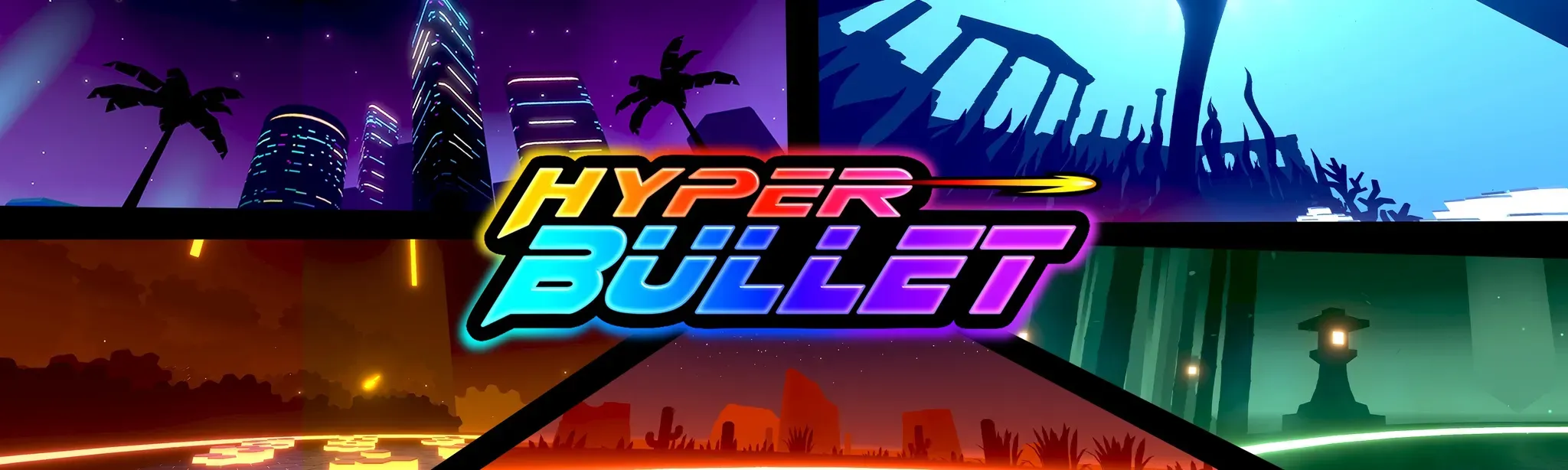 The official key-art banner is a montage of several Zone backdrops behind the logo: a purple neon city skyline (palm trees + lit skyscrapers, top-left), blue ruins (top-right), a green lantern-lit garden (bottom-right), a red desert with cacti (bottom-center), and a glowing orange field (bottom-left). These are different Zone looks, not separate game modes.
What a Zone really is
In dump.cs (around line 407744) a Zone is a ZoneDefinition ScriptableObject. Reading its serialized fields is the clearest proof that a Zone is a backdrop, not a battlefield. A single Zone controls:
- The hex floor — two tile colors (
m_hexColor0,m_hexColor1), a glow color (m_hexGlow), grout color (m_groutColor), and gap size (m_hexGap). - The side walls / lights —
m_sideLight,m_sideDark, a light direction (m_sideLightDirection), and an optional side texture (m_sideTexture). - The sky — a full gradient (
m_skyTopColor/m_skyMiddleColor/m_skyBottomColorplus am_skyGradienttexture and an optionalm_skyTexture). - Clouds — left/right cloud colors, coverage (
m_cloudsCoverage), and a scroll speed (m_cloudsScrollSpeed). - Atmosphere and midground — an
Atmosphereand aMidgroundobject for fog, haze, and the distant backdrop. - The spawn flash — a per-Zone target color (
m_spawnColor) plus spawn/despawn cosmetic timing values (CosmeticOnSpawn/CosmeticOnDespawn, both floats) and hue/saturation/value tuning (m_cosmeticHueStart,m_cosmeticHueRange,m_cosmeticSaturation,m_cosmeticValue). - Music — a background track (
m_musicBackground) and a separate streamer-safe track (m_musicBackgroundStreamer) for Streamer Mode.
Each Zone also carries a node color (m_nodeColor) — the tint used for that Zone's nodes when you look at The Monolith map — and an exclude flag (m_exclude) that can keep it out of the random rotation. Notice what is not in this list: no enemy lists, no spawn tables, no win condition. That all lives elsewhere. A Zone is the skin.
The Zone theme is static, but a separate layer of feedback plays on top of it: the WorldGlow component pulses the whole arena a color on key events. Its PulseColors are NEUTRAL, GOOD, BAD, EXTRA_TIME, and CURSE (each with its own color — m_good, m_bad, m_extraTime, m_curse), driven by PulseWorldGlow(color, time, multiplier). So the arena flashes green on a good play (a clean hit or building combo), red on a bad one (a miss), a distinct color the moment you gain extra time, and a special Curse color when a Curse fires (DoCurse). It's pure juice — reactive feedback riding on top of the fixed Zone look, not a change to the Zone itself.
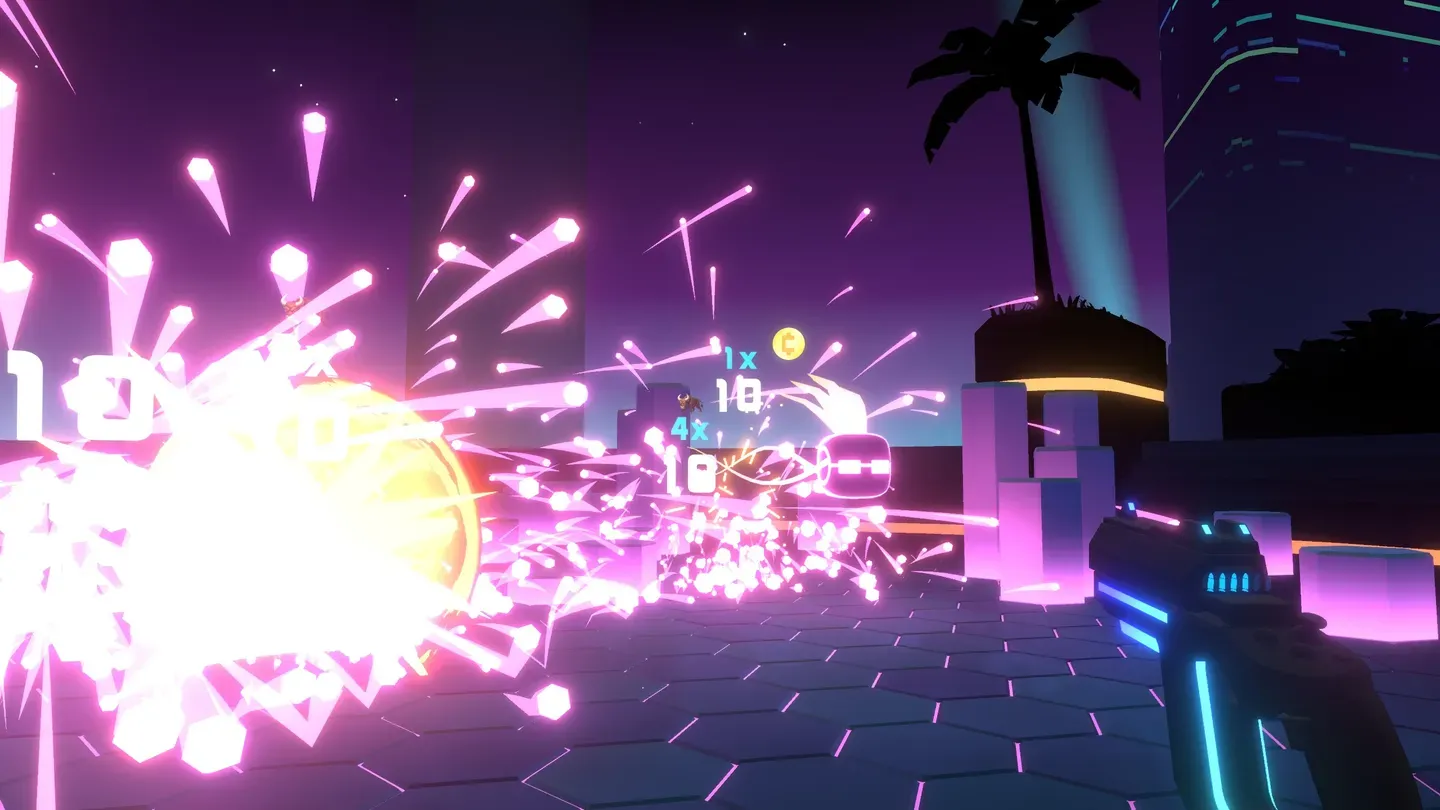 A purple-city Zone in action — purple sky, silhouetted palm trees, lit skyscrapers, and a hexagonal tiled floor. Targets burst into floating "10" point pops, with a "4x" combo and a Coin drop, all over the signature pink-and-purple glow.
The hex floor is universal
No matter the Zone, the ground is always a grid of hex tiles and the walls glow in the Zone's accent colors. Environment-reactive Augments — Detonator (Targets explode), Arctic Pod (freeze), Arc Module (lightning) — behave the same everywhere, so your build carries cleanly from Zone to Zone.
How Zones change as you climb the Monolith
You don't pick Zones — the run assigns them. The ZoneManager (the asset that loads and swaps ZoneDefinitions) drives this with a small set of confirmed constants:
| Constant | Value | What it means |
|---|---|---|
ZONE_FOLDER | "Zones/" | Where Zone assets are loaded from. |
TRANSITION_SECONDS | 2.5 | How long a normal cross-fade between Zones lasts. |
LAYER_PREF_COEF | 3 | Weighting factor used when randomly picking a Zone for a Monolith layer. |
SHOP_ZONE | "shop" | The dedicated shop backdrop. |
HOME_ZONE | "shopStandby" | The home / standby backdrop (menu and between-run lobby). |
FALLBACK_ZONE | "synth" | The Zone used when no other choice is available. |
A few things worth knowing:
- Transitions cross-fade over ~2.5 seconds.
ZoneManager.CoTransitionruns theTRANSITION_SECONDS = 2.5fade. Some swaps are instant instead — there is anIsInstantTransitionflag (SetInstantTransition) for that. - Zones are chosen per Monolith layer, with weighting.
SelectWeightedRandomZoneMeta(layer, mapParams, exclusions, strictExclusions)picks a Zone for a layer usingLAYER_PREF_COEF = 3, and there are alsoSelectRandomZoneMetaandSelectAllAvailableZones. The exclusions set is what keeps the world from snapping to a brand-new look every single node — it's the real mechanism behind a theme "settling in" for a stretch before drifting to something new. - The shop has its own backdrop.
TransitionToShopZone()swaps to the"shop"Zone, so you always know at a glance that you're between rounds and free to spend Coins on Mods. - The menu / between-runs lobby is one standby Zone.
TransitionToHomeZone()swaps to"shopStandby". The menu and the standby lobby are the same Zone (HOME_ZONE), not two different ones.
Scenery is a free progress cue
Because the look shifts as you ascend the Monolith, a sudden change of backdrop is a handy mental marker that you've moved into a new stretch of the run.
How many Zones are there?
The exact number is unconfirmed. The full Zone set is stored in a serialized list, ZoneManager.m_zoneMetadata (a List<ZoneManager.ZoneMetadata>), and that list is not enumerated anywhere in the dump — so there is no source that says "18 Zones," "14 battle Zones," or any other count. Each entry (ZoneManager.ZoneMetadata) is tiny: just an id string and a nodeColor. The actual ZoneDefinition assets are loaded by id from the Zones/ folder.
Just as importantly, Zones have no player-facing display names. There is no Zone or arena name anywhere in loc_en.json (the only "zone" entry, TUTORIAL_MAP_SPLIT_ZONE, is about a path split, not a backdrop). So while the game clearly has multiple themed backdrops — you can see five of them in the key art above — the wiki can't responsibly hand you a named, described list.
Confirmed special Zones
These four are the only Zones whose ids appear directly in the code:
| Zone id | Constant | Role |
|---|---|---|
shop | SHOP_ZONE | The shop interior shown between rounds (TransitionToShopZone). |
shopStandby | HOME_ZONE | The home / standby lobby for the menu and gaps between runs (TransitionToHomeZone). |
synth | FALLBACK_ZONE | The fallback Zone used when no other choice applies. |
default | — | A Zones/default asset loaded specifically when "No zone meta found." (a distinct, last-resort fallback). |
Note that there are two different fallbacks: synth (the FALLBACK_ZONE constant) and the separate Zones/default asset that loads only when the game logs "No zone meta found. Loading default zone." They are not the same thing, and neither is a named "battle arena."
No "boss," "lava," "matrix," or "honeycomb" Zone
The strings honeycomb, a lava zone, and a matrix zone do not exist anywhere in the game's data. (lava shows up only as the enemy id enemyLavaBlob; matrix only inside Unity's shader/math internals.) There is also no boss Zone id — boss fights reuse the normal Zone system; ZoneManager exposes TransitionToShopZone / TransitionToHomeZone / TransitionToZone, but no boss-zone constant.
What we can say about themed Zones
The Zone ids themselves live in that un-enumerated m_zoneMetadata list, but a handful of zone-prefixed strings do appear elsewhere in the data, hinting at the themes the developers built: bazaar, blue, canyon, ocean, and white appear as standalone strings, plus compound ids like cityscapeBackseatRider, castleRevenant, iceFranticPace, factoryDarkConsole, canyonNeonDesert, bambooIronclad, bazaarStateless, synthTitan, and oceanOne. These tell us a city, a castle, a canyon, ice, a factory, bamboo, a bazaar, an ocean, and a "white" theme almost certainly exist — but the game never attaches a description or display name to any of them, so any detailed "vibe" write-up of a specific Zone would be invented, and isn't included here.
Why Zones matter to you
Mostly, Zones are a flow-state booster — a constantly shifting backdrop keeps a fast, repetitive score-attack game feeling fresh wave after wave. A few practical notes:
- Visibility. Brighter backdrops make Targets and point pops easy to read; darker, moodier ones lean into atmosphere. Your aim doesn't change, but knowing a Zone's look helps you stay locked in.
- Spawn flashes are tuned per Zone. Each
ZoneDefinitionsets its ownm_spawnColor, so the flash a Target makes when it appears is matched to the current Zone — a subtle cue that something just entered the arena. - Nodes are tinted too. Each Zone carries a
nodeColor, so the Monolith map nodes pick up the current theme's tint — another quiet way the game signals where you are. - Don't sightsee mid-round. The backdrops are gorgeous, but a wave is on a tight clock (you start with 30 seconds, gaining +10 if you lose a life). Admire the view in the shop Zone, then get back to clearing Targets.
See also
- The Monolith — the tower run that assigns a Zone to each layer
- Targets — the things you're actually shooting in each Zone
- Tools — the Pistol, SMG, and Shotgun you bring along
- Augments — including the environment-reactive ones (Detonator, Arctic Pod, Arc Module)