Appearance
Editions & Cosmetics
Your Tool is the one thing you stare at for an entire run, so why not make it look the part? Hyper Bullet lets you restyle your Pistol, SMG, and Shotgun with a wardrobe of unlockable Editions. None of it touches your score, reload speed, or Mods — it is pure neon flair — but a clean Edition makes every reload feel a little more satisfying.
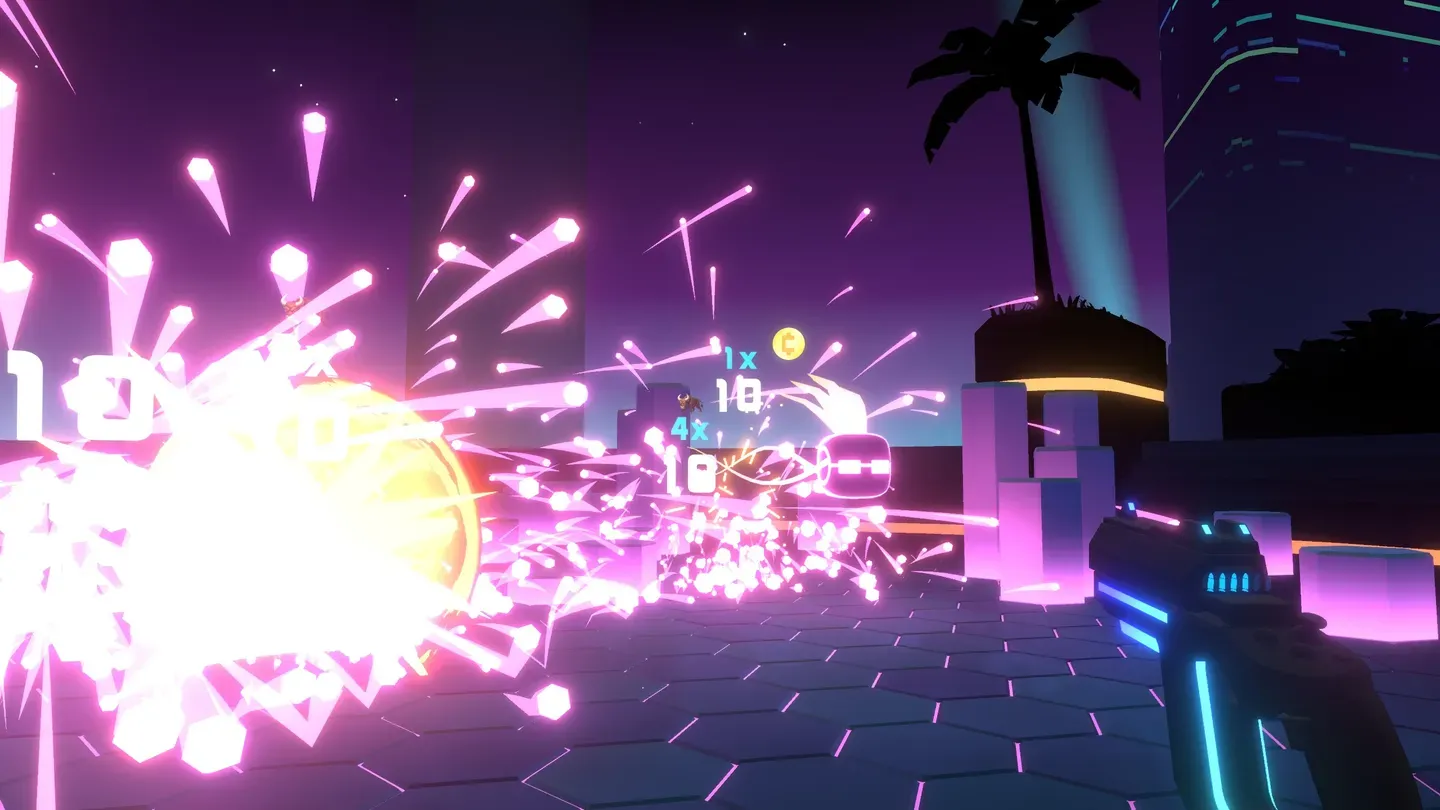 Your Tool is always in frame — this Pistol's glowing blue trim is exactly the kind of detail an Edition changes.
Quick facts
- Editions: 41 per Tool — the in-game count for the cosmetics added with Trials
- Effect on gameplay: none — cosmetic only, never changes scoring, reloads, or Mods
- How you get them: complete Trials at all difficulties — "Awarded for completing Trials at all difficulties!"
- Where you equip them: the Select a Tool screen, then pick an Edition
- Extra personalization: Reload Style (Magazine / Single) and Laser Color under Options
- See the Tools up close: spinnable 3D models on the Tools page
Quick definitions: the thing in your hand is a Tool (Pistol, SMG, or Shotgun). An Edition is a cosmetic look you apply to a Tool. It is appearance only.
How Editions work
In-game, these looks live under the Editions system. The tutorial spells it out:
"Completing challenges unlocks special Tool Editions.""Select an Edition to alter the appearance of a Tool."
Each look is simply a different Edition of one of your three Tools. Here is the flow:
- Each Tool has its own set of Editions. The Pistol, SMG, and Shotgun all carry the same families of looks (Camo, Metal, Stickerbomb, and so on), but each is sculpted to that Tool's shape. A Camo Edition on the Shotgun is a different unlock than Camo on the Pistol. The Trials update added 41 Editions for each Tool.
- Most are earned through Trials. Every Tool starts with its free Default Edition. Beyond that, you unlock new Editions by completing Trials — the game's special challenge runs. There are 10 Trials per Tool, and the changelog is explicit: Editions are "Awarded for completing Trials at all difficulties!" In practice, clearing a Trial across its difficulty levels grants that Trial's associated Edition.
- Apply it once and it sticks. Picking an Edition changes that Tool's appearance everywhere — in menus, in your hand mid-run, and in screenshots or streams.
Note: Editions are unlocked by Trials, not by clearing the Monolith directly. The Monolith is its own challenge with its own reward — see the Monolith Edition below.
Why Trials matter for Editions: internally, each Trial carries a single Edition unlock, and each Tool stores its own lists of Trials and Editions. Finish a Trial and you earn the Edition tied to it. The Tools you can run Trials on are the Pistol, SMG, and Shotgun.
Where to find your cosmetics: the Collection menu
Everything you have unlocked is tracked in the Collection, reachable from your Profile on the main menu. The Profile is also where the game shows off your progress with three percentages:
| Stat | What it measures (in-game wording) |
|---|---|
| Collection | "The percentage of mods and hacks that you have found so far." |
| Completion | "The percentage of mods and hacks that you have used to triumph over a monolith." |
| Mastery | "The percentage of mods and hacks that you have used to complete the Impossible feat." |
To re-style a Tool, open the Select a Tool screen, choose your Tool, and pick an Edition to apply. You will also find two more personalization options in Options:
- Reload Style — Magazine or Single (the second option's label uses the cartridge noun, i.e. "Single Cartridge"). Magazine drops a full mag; Single loads one cartridge at a time. This is a feel preference as much as a look.
- Laser Color — recolor your aiming laser to match your Edition or just your taste.
The Monolith Edition
The Edition-select screen has two special slots per Tool alongside the regular Edition buttons: a Default Edition and a separate Monolith Edition. The Monolith Edition is distinct from Default and is most likely a reward tied to beating the Monolith rather than to Trials. (The exact unlock text is not exposed in the data, so treat the "beat the Monolith" framing as the best-supported reading.)
See your Tools in 3D first
Want to know exactly what an Edition is wrapping before you grind for it? The Tools page has interactive 3D models of every Tool, built from the real in-game meshes. You can spin the Pistol, SMG, and Shotgun, look at them from any angle, and see every panel an Edition recolors or restyles.
Head to Tools to rotate the Tools yourself, then come back here to plan which Editions you want on each one.
Edition families
The art assets that ship with the game are organized into a handful of themed families that appear across all three Tools, plus the stock Default look. Note that the families do not all have the same number of variants — Flow and Metal have three each, while Camo, Cell-Shaded, Ornate, and Stickerbomb have four.
These are the families present in the game's Tool art (Pistol, SMG, and Shotgun share the same set):
| Family | The vibe | Variants |
|---|---|---|
| Camo | Military / woodland camouflage patterns — low-key and tactical | 4 — Arctic, Digital, Jungle, Urban |
| Cell-Shaded | Bold comic-book look with hard outlines, like a cartoon gun | 4 — Brown, Orange, Red, Yellow |
| Flow | Smooth liquid gradients and flowing color | 3 — Ice, Lava, Water |
| Metal | Brushed, polished, and raw metallic surfaces | 3 — Bronze, Gold, Iron |
| Ornate | Engraved, decorative, almost regal detailing | 4 — Jade, Marble, Polymer, Wood |
| Plastic | Bright, glossy molded-plastic toy-gun look | Plastic finish |
| Stickerbomb | Chaotic layered stickers plastered over the gun | 4 — Blue, Green, Multi, Pink |
| Default | The stock look every Tool ships with | Free, one per Tool |
About the count: the families above are what's visible in the Tool art folder. The game's own headline figure is 41 Editions per Tool, so the full Edition list includes more looks (and per-Tool special Editions like the Monolith Edition) than the families shown here. We list the families we can verify directly and avoid inventing exact totals.
Picking a look for each Tool
Because the families repeat across all three Tools, you can either theme your whole loadout (run Camo on everything for a unified tactical kit) or mix and match (a stealthy Camo Pistol, a loud Stickerbomb Shotgun). A few popular pairings:
| If you want... | Try this |
|---|---|
| A clean, serious competitive look | Metal (Bronze / Gold / Iron) or Cell-Shaded across all three |
| Maximum visibility for streaming | Stickerbomb or Plastic — loud and easy to read on camera |
| Something colorful and fluid | Flow (Ice / Lava / Water) |
| To show off detail and progression | Ornate (Jade / Marble / Polymer / Wood) |
Tip: Streaming? A high-contrast Edition like Stickerbomb or a bright Plastic colorway pops on camera. See the Streaming page for Streamer Mode, Twitch, and capture setup.
Under the hood: what an Edition actually changes
Editions are more than a flat texture swap. Each Edition asset (internally a GunSkinAsset) can change a few things on your Tool:
- Bullet colors. An Edition defines its own full, special, and empty bullet colors, so your ammo readout can match the look.
- A prismatic option. Some Editions flag a "prismatic" display mode for a shifting, iridescent finish.
- Extra geometry. Editions can pull in mesh additions (the game references a
GunSkins/MeshAdditionsfolder, with examples like a plastic "internal" piece), so a handful of Editions change the Tool's shape, not just its surface.
None of this affects gameplay — it is all visual — but it is why some Editions feel like genuinely different Tools rather than recolors.
Getting the SMG and Shotgun
The Pistol is your starter Tool. The SMG and Shotgun are unlocked through the Hyper Value Bundle, which the game describes as:
"Includes Shotgun, SMG, Endless Mode and all future Add-ons!"
So the same purchase that opens up the extra Tools also unlocks Endless Mode and every future add-on. Once you own a Tool, its full set of Editions becomes earnable through Trials like any other.
Quick FAQ
Do Editions give any gameplay advantage? No. Editions are cosmetic only. They never change scoring, reload speed, or anything a Mod does.
How do I unlock more Editions? Complete Trials. Each Tool has 10 Trials, and Editions are "Awarded for completing Trials at all difficulties!" The Monolith Edition is a separate reward tied to the Monolith.
Where do I equip an Edition? On the Select a Tool screen: pick the Tool, then choose an Edition to apply. Recolor your aiming laser separately under Options → Laser Color, and switch your Reload Style (Magazine / Single) there too.
Can I preview the Tools up close? Yes — the Tools page has spinnable 3D models of all three Tools built from the real game meshes.
A note on the data: Hyper Bullet bundles the LIV LCK mixed-reality streaming SDK (the
Liv.Lck.Corenamespace, including itsCosmeticsReturnCodecodes and LCK "cosmetics" calls). Those are part of the capture/streaming integration and are unrelated to Tool Editions — they do not unlock or define Editions.
See also
- Tools — the Pistol, SMG, and Shotgun, with interactive 3D models to spin
- Mods — the build pieces that actually change your scoring
- The Monolith — the run you climb; source of the special Monolith Edition
- Modes — Trials and challenges that reward Editions
- Streaming — show off your loadout on stream
- Game Info — platforms, price, and sources