Appearance
How to Play
HYPER BULLET is 30 seconds of pure, focused neon chaos at a time. Your tracked hand becomes a glowing Tool, you process Targets into showers of points, and the only thing between you and a screen-filling high score is the clock. This is your getting-started guide: setup, controls, and the loop you'll fall into for hours.
The basics take about a minute to learn. The depth comes later, from Mods, Augments, and your climb up The Monolith.
Quick facts
- Round length: 30 seconds per Wave ("You have 30 seconds.").
- Hearts (lives): You start each run with 3.
- Goal: Reach the Target score before time runs out (Processing Complete).
- On a fail: Lose 1 heart, gain +10 seconds, and retry the Wave.
- Run ends: When all 3 hearts are gone (Failure to Process).
- Reload: Point the Tool down toward the floor — it reloads automatically.
- Platform: Meta Quest 2 / Pro / 3 / 3S (VR-only), stationary shooter (no walking).
- Full climb: Beat 15 Waves to defeat the Monolith.
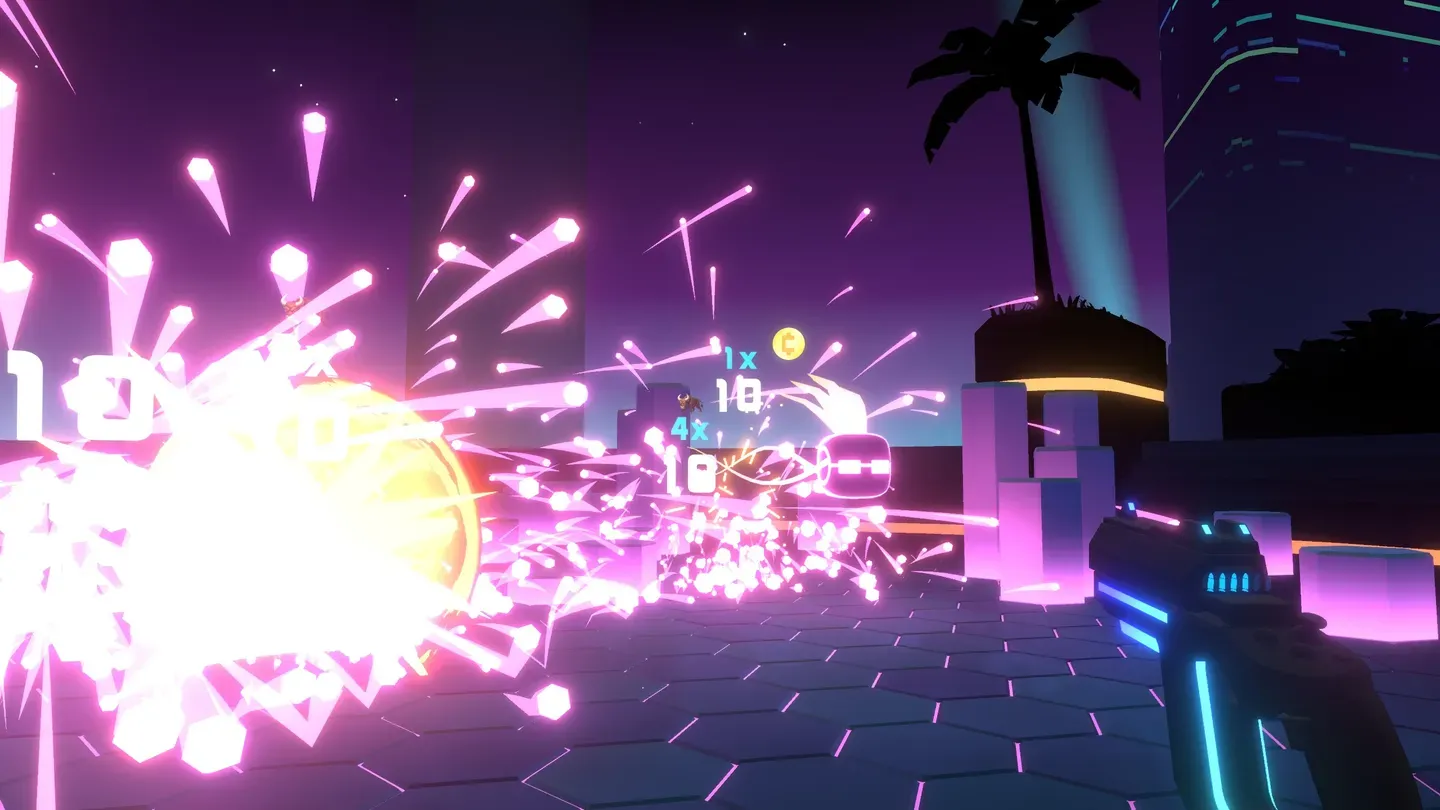 The whole game in one frame: your Tool in hand, Targets processing into points, and your multiplier stacking with every hit.
The fantasy
There's no controller in your hand here — there's a Tool. Your tracked, real-world hand is the Tool. Raise your arm and the Pistol (or SMG, or Shotgun) follows it exactly. Sweep it across a wave of Targets and pull the trigger, and they pop into glowing numbers that float up and fade.
The game frames you as an operator "processing" Targets on a deadline. Every Wave is a burst of intensity — then a calm moment to make a choice that shapes your whole run. Lean into it: aim fast, read your score popups, and let the flow take over.
Tip: HYPER BULLET is a stationary shooter. You stand (or sit) in one spot and aim — you never walk around the level. So there's no motion sickness from movement, and no teleporting or snap-turning to learn.
VR setup
HYPER BULLET runs on Meta Quest 2, Quest Pro, Quest 3, and Quest 3S — it's VR-only.
Pick your play space
You can play in any of three setups — choose whatever's comfortable:
| Play mode | Best for |
|---|---|
| Standing | The default. Full range of motion to swing your Tool around. |
| Sitting | Couch or office chair — totally viable, since you never move your feet. |
| Room-scale | The most space to lean, but a small boundary is plenty. |
Because you stay in one spot, you only need a small clear area in front of you.
Tip: Set your Guardian/boundary with enough room to fully extend your shooting arm in front of you and off to both sides — Targets can appear across a wide arc.
Basic controls
Everything you do in a round comes down to three actions. This is the entire control scheme — straight from the in-game How to Play screen:
| What you want to do | How to do it |
|---|---|
| Aim | Point your tracked hand at a Target — the Tool aims wherever your hand aims. |
| Shoot Targets to get points | Pull the trigger. |
| Point Tool down to reload | Tip the Tool toward the floor; it reloads automatically. |
That's it. There's no holster button and no magazine fumbling — to reload, you literally point the Tool downward and it reloads itself. Then bring it back up and keep firing.
Tip: The trigger is what fires, not a button click — squeeze it to shoot. On the SMG you can hold it down to spray; on the Pistol and Shotgun you pull per shot. See Tools for how each one handles.
Reloading is part of your rhythm
Pointing down to reload feels strange for one round, then becomes second nature. The faster and cleaner your reload, the more Targets you process before the clock runs out. Fire your mag dry, flick the Tool down, swing back up, and you've lost almost no time. You can even spend Coins on reload speed in the Shop — the tutorial nudges you to "improve your reload speed" — to make the habit pay off even more.
The 30-second round
Every node on your climb is a single, self-contained round. As the tutorial puts it plainly: "You have 30 seconds."
- You have 30 seconds.
- A Target score sits at the top of your view (labelled Target), and your live Score ticks up beside it.
- Reach the Target score before time runs out. Hit it and the Wave is cleared — Processing Complete.
Shoot Targets, they burst into points, your Score climbs. Your job is to get from your current Score up to the Target number before the timer hits zero. Every standard Target is worth 10 base points before your Mods and combo go to work — read the Scoring page to see how 10 becomes a massive number.
Tip: Don't tunnel-vision on a single Target. Wide, fast sweeps that catch clusters — especially with the Shotgun or explosive Mods — rack up points far faster than careful single picks. Speed beats precision here.
Where the points come from
The full scoring chain is short to learn and deep to master. In the game's own words:
- Targets are worth 10 points.
- Red Mods ADD to this — they raise a Target's flat value (the tutorial shows a +3 turning a 10 into a 13).
- Then, Blue Mods increase your base 1x MULTIPLIER — your multiplier starts at 1x, and a Blue Mod adding 1x doubles a Target's potential to 2x (so 13 × 2x = 26).
- On top of that, a Critical Hit — a base 20% chance per Target — doubles that Target's total value.
So the rough shape is: (10 + your ADD) × (1x + your MULTIPLY) × Combo, then doubled on a crit. The full breakdown lives on the Scoring page.
Combo
Your Combo is the multiplier that rides on consecutive hits:
- Each consecutive hit increases your multiplier by 1x.
- A miss resets your combo.
- The default max combo is 3x (Mods, Augments, and items can raise that cap).
Keep your hits clean and you climb to the cap fast; whiff a shot and you start over. Some Tools lean into this directly — the Pistol's pre-installed Combo Augment "rewards consecutive hits."
Hearts and lives
You don't die in one bad moment — you get chances. You start each run with 3 hearts.
If the timer runs out before you reach the Target score, here's what happens, in the game's own words:
Failed? Lose a ❤ and gain +10 secs.
So a failed Wave isn't game over. You lose one heart and the round restarts with +10 seconds added to the clock, giving you breathing room to make it. Lose all three hearts, though, and the run ends — Failure to Process.
| Starting hearts | 3 |
| On a failed Wave | Lose 1 heart, gain +10 seconds, retry the Wave |
| All hearts gone | Run over (Failure to Process) |
Tip: Hearts are precious, but they're also a resource. A tough Target score with a juicy reward can be worth eating a heart for — you'll still get the +10 seconds to retry. Watch for the Heart Glitch too — hitting it can hand back a heart.
The moment-to-moment loop
Once you're in a run, you'll settle into a satisfying rhythm:
- Process a Wave. Aim, fire, point down to reload, repeat — hit the Target score inside 30 seconds.
- Get rewarded. Clearing a Wave gives you a choice of reward, and you spend the Coins you've earned in the Shop on Mods to improve your Tool. (If you don't like the Shop's offerings, you can refresh its inventory.)
- Arrange your build. Mods sit in a row and you can drag them to rearrange. For ordinary ADD/MULTIPLY Mods this is just tidiness — it doesn't change your score — but a few Mods act on the slot next to them (and one rewards empty slots), so place those deliberately. See Mods.
- Choose your path. The route up The Monolith branches ("The path splits. A decision must be made."). Pick safer Normal Waves or risk node types that pay more.
- Climb. Repeat until you beat 15 Waves and defeat the Monolith — then chase a bigger run next time.
That snowball — small decisions stacking into massive score explosions — is the heart of the game. The first run teaches you the ropes; every run after, you'll be hunting a better build.
Tip: Before a run you also pick a difficulty — Easy, Normal, Hard, or Insane. As the game says, "More difficulty, greater rewards." Start on Easy or Normal, then climb the difficulty ladder as your aim sharpens. See Game Modes.
Reading the map: node types
As you climb, each node on the Monolith path is marked with an icon telling you what's inside. The basics you'll meet right away:
| Node | What it means |
|---|---|
| Normal Wave | A standard round. "Normal Wave." |
| Elite | "Harder, but more coins." |
| Curse | "Curse, but more coins" — a negative effect for extra Coins. |
| Augment available | An Augment can be claimed here. |
| Super Socket available | A Socket enhancement that empowers the Mod placed in the Socket position. |
| Hack available | A Hack — a powerful permanent boost earned through Wave mastery. Elite Hacks are the bigger, choose-carefully version. |
| Permanent (Hack) Wave | These Waves "contain long lasting Hacks." |
See The Monolith for the full node list (including Bosses and Bonus nodes) and how to plan your route.
The Shop and Mods
When you clear a Wave you get a reward and a chance to visit the Shop, where you spend Coins on Mods to build up your Tool. A few things the tutorial wants you to know:
- Mods come in color-coded categories. The How to Play screen lists them as ADD (red, raises a Target's flat value), MULTIPLY (blue, raises your multiplier), UTILITY (green — "Green mods unlock more... exotic functions"), COIN, UNIQUE, and RAINBOW.
- Keep buying the same Mod to increase its level. "Most mods can be upgraded to Level 5." (Sockets and Hacks can push some Mods past that.)
- Tiers show as stripes. "Two stripes means this is a stronger mod. More stripes, more power." — a quick visual read of how strong a Shop Mod is.
- Drag Mods to arrange them for maximum effect. Order is just tidiness for plain ADD/MULTIPLY Mods, but matters for the few that affect their neighbours.
- Don't like the offerings? The Shop's inventory can be refreshed, and you can freeze a Mod to save it for later if you can't afford it yet.
The deep dive lives on the Mods page.
First-run tutorial
Your very first time in, the game drops you into a short Training sequence. A calm voice walks you through shooting, reloading, picking your first Mods, arranging them, and reading the Monolith — all hands-on, at your own pace. You can't fail it: if you run out of hearts during training, the game simply hands you 3 more and tells you to keep learning ("You are learning. Accept 3 more ❤.").
Tip: Want a refresher later? How to Play is always available from the Main Menu — no need to replay the tutorial.
Make it fit your hands: Aim Adjust
Everyone holds a controller a little differently, so HYPER BULLET lets you fine-tune exactly where the Tool sits and points relative to your hand. In Options, look for Aim Adjust:
| Setting | What it changes |
|---|---|
| Yaw / Pitch / Roll | Rotates the Tool so the barrel lines up with where you're naturally pointing. |
| X / Y / Z Offset | Slides the Tool's position to match your grip. |
Tweak these once and your aim will feel locked-in. If you over-do it, there's a Reset to put the Tool back to default.
Tip: If your shots feel like they're landing a touch high or to one side, nudge the Pitch and Yaw by small amounts until the laser lands exactly where you expect. A minute here pays off all game. You can also change your Laser Color in Options to whatever's easiest for you to track.
Streaming and capture
Want to share your runs? HYPER BULLET has you covered:
- Streamer Mode — a toggle in Options that keeps your stream clean.
- Twitch chat — add your channel in Options ("Add your Twitch channel. Read your chat by looking at your wrist.") and read it in-game just by glancing at your wrist (read-only).
- LIV Camera — built-in mixed-reality capture to Record your runs or Stream them online, with Selfie, First Person, and Cinematic angles.
For the full rundown, see the Streaming page.
See also
- Tools — Pistol, SMG, and Shotgun, and how each one feels.
- Scoring — how 10 points becomes a massive number (ADD, then MULTIPLY, then Combo, then crits).
- The Monolith — the 15-Wave climb, node types, and how to plan your route.
- Mods — the build system that turns a good run into a great one.
- Game Modes — difficulties, Trials, and Endless Mode.
- Tips & Strategy — sharpen your runs once you've got the basics.
Now grab your Tool, point it at the neon, and start processing.